
Visit us at Corner House, Mezzanine, 3 Kimathi St, Starehe

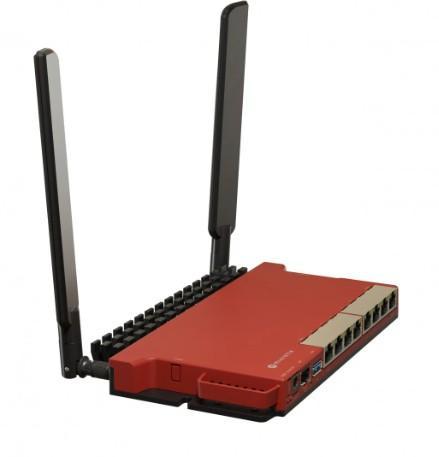

MikroTik L009UiGS-2HaxD-IN (Hex S) – Professional Networking Powerhouse
The MikroTik L009UiGS-2HaxD-IN (Hex S) transcends ordinary routing, delivering enterprise-grade features in a compact metal chassis. Designed for network professionals, this versatile device combines cutting-edge Wi-Fi 6 technology with extensive wired connectivity and the powerful RouterOS software platform.From giltech technologies
Mikrotik l009UiGS-2HaxD-IN
Enterprise Features in a Compact Design
-
Wi-Fi 6 Efficiency: 2.4GHz 802.11ax support for better performance in crowded environments
-
Abundant Connectivity: 8 Gigabit Ethernet ports eliminate the need for additional switches
-
Fiber Ready: SFP port for high-speed fiber optic uplinks and long-distance connections
-
PoE Flexibility: PoE-in for easy powering, PoE-out on port 5 for compatible devices
🔧 Advanced Networking Capabilities
-
Dual-Core Processing: Powerful ARM CPU handles complex routing, firewall rules, and VPN tunneling
-
Full RouterOS: Lifetime license with free updates for complete network control
-
Professional Features: Bandwidth management, dynamic routing, and container support
-
Robust Construction: Metal casing ensures durability and optimal heat dissipation
Key Specifications Table
| Specification | Details |
|---|---|
| Model | MikroTik L009UiGS-2HaxD-IN (Hex S) |
| CPU | Dual-core ARM 1 GHz |
| Wi-Fi | Wi-Fi 6 (802.11ax) 2.4 GHz |
| Ethernet Ports | 8 x Gigabit |
| Special Ports | SFP cage, PoE-In, PoE-Out (port 5) |
| OS | RouterOS Level 4 |
| Memory | 512 MB NAND, 256 MB RAM |
Most Asked Questions
Q: What’s the advantage of Wi-Fi 6 on 2.4GHz only?
A: Wi-Fi 6 on the 2.4GHz band provides better efficiency, increased capacity for multiple devices, and improved performance in crowded environments where traditional 2.4GHz networks struggle with interference.
Q: Can this replace my existing router and switch?
A: Absolutely. With 8 Gigabit ports, it can serve as both your main router and network switch, eliminating the need for separate equipment in small to medium setups.
Q: What can I connect to the SFP port?
A: The SFP port accepts fiber optic transceivers, allowing connections to fiber networks, ISP uplinks, or for creating long-distance links between buildings with appropriate SFP modules.
Q: Is RouterOS difficult to configure?
A: While RouterOS is extremely powerful, it does have a learning curve. However, it offers both a graphical interface (WebFig) and command-line for all experience levels, with extensive documentation available.
more info….
Only logged in customers who have purchased this product may leave a review.
Related products


MikroTik Router RB4011iGS+RM
Original price was: KSh28,500.00.KSh28,000.00Current price is: KSh28,000.00.
MikroTik cAP ac (RBCAPGI-5ACD2ND)
Original price was: KSh13,000.00.KSh12,000.00Current price is: KSh12,000.00.
Mikrotik SXT SQ 5AC | Outdoor
Original price was: KSh8,000.00.KSh7,900.00Current price is: KSh7,900.00.
 MikroTik L009UiGS-2HaxD-IN (He...
KSh19,500.00
Reviews
There are no reviews yet.